SQLite数据类型,查看工具 SQLite数据库查看工具http://mysuperbaby.iteye.c…
不静之心
总是乐于收藏和分享,有助于个人成长

作者:<span class="vcard">不静之心</span>
AdapterView.OnItemClickListener怎样获取点击那一项的内容
AdapterView.OnItemClickListener怎样获取点击那一项的内容 http://bbs….
如何取消或定制当点击GridView 的时候出现的那个黄色背景
如何取消或定制当点击GridView 的时候出现的那个黄色背景 http://www.eoeandroid.c…
调用字符串资源的几种方法
调用字符串资源的几种方法 http://www.cnblogs.com/bobli/archive/2011/…
如何让AlertDialog 在点击确定或者取消时不消失
如何让AlertDialog 在点击确定或者取消时不消失 http://hi.baidu.com/doyee/…
Android + jQuery Mobile
Android + jQuery Mobile android WebView结合jQuery mobile之…
TableLayout
很详细的说明 Android UI学习 – TableLayout http://android….
Jav8: Java里面调用js代码
Jav8: Java里面调用js代码 官方:https://code.google.com/p/jav8/ A…
Android sqlite中判断某个表是否存在方法
Android sqlite中判断某个表是否存在方法 http://mycoding.iteye.com/bl…
Android中在Sqlite里面无法创建表及无法插入数据的原因
Android中在Sqlite里面无法创建表及无法插入数据的原因 一般大家使用Android中的sqlite数…
SQLiteOpenHelper, SQLiteDatabase, ContentProvider
SQLiteOpenHelper, SQLiteDatabase, ContentProvider SQLit…
Android样式与主题
Android样式与主题 android样式,主题设置心得 http://zhy584520.iteye.co…
圆角和边框们
圆角和边框们 Drawable资源–Shape的使用 http://www.eoeandroid….
Android的两种异步调用
Android的两种异步调用 1. Handler + Thread 由主线程打开对话框, 然后使用新的线程(…
蓝牙操作
蓝牙操作 Android蓝牙开发浅谈 http://www.eoeandroid.com/thread-189…
android几种对话框和菜单
android几种对话框和菜单
|
1 2 3 4 5 6 7 8 9 10 11 12 13 14 15 16 17 18 19 20 21 22 23 24 25 26 27 28 29 30 31 32 33 34 35 36 37 38 39 40 41 42 43 44 45 46 47 48 49 50 51 52 53 54 55 56 57 58 59 60 61 62 63 64 65 66 67 68 69 70 71 72 73 74 75 76 77 78 79 80 81 82 83 84 85 86 87 88 89 90 91 92 93 94 95 96 97 98 99 100 101 102 103 104 105 106 107 108 109 110 111 112 113 114 115 116 117 118 119 120 121 122 123 124 125 126 127 128 129 130 131 132 133 134 135 136 137 138 139 140 141 142 143 144 145 146 147 148 149 150 151 152 153 154 155 156 157 158 159 160 161 162 163 164 165 166 167 168 169 170 171 172 173 174 175 176 177 178 179 180 181 182 183 184 185 186 |
Java代码 package com.example.ADemo4; import android.app.Activity; import android.app.AlertDialog; import android.content.DialogInterface; import android.graphics.Color; import android.os.Bundle; import android.view.LayoutInflater; import android.view.Menu; import android.view.MenuItem; import android.view.View; import android.widget.Button; import android.widget.Toast; public class MyActivity extends Activity { public static final int RED_MENU_ID = Menu.FIRST; public static final int GREEN_MENU_ID = Menu.FIRST + 1; public static final int BLUE_MENU_ID = Menu.FIRST + 2; private Button mButton; /** * Called when the activity is first created. */ @Override public void onCreate(Bundle savedInstanceState) { super.onCreate(savedInstanceState); setContentView(R.layout.main); mButton = (Button) findViewById(R.id.button); mButton.setOnClickListener(new View.OnClickListener() { @Override public void onClick(View view) { (new AlertDialog.Builder(MyActivity.this)).setMessage("确定是否退出程序") .setTitle("普通对话框") .setCancelable(false) .setPositiveButton("确定退出", new DialogInterface.OnClickListener() { @Override public void onClick(DialogInterface dialogInterface, int i) { //To change body of implemented methods use File | Settings | File Templates. MyActivity.this.finish(); } }) .setNegativeButton("取消推出", new DialogInterface.OnClickListener() { @Override public void onClick(DialogInterface dialogInterface, int i) { dialogInterface.cancel(); } }) .create() .show(); } }); Button button1 = (Button) findViewById(R.id.button1); button1.setOnClickListener(new View.OnClickListener() { @Override public void onClick(View view) { (new AlertDialog.Builder(MyActivity.this)) .setTitle("对话框头部") .setTitle("List对话框") .setItems(R.array.select_dialog_items, new DialogInterface.OnClickListener() { @Override public void onClick(DialogInterface dialogInterface, int which) { String[] items = getResources().getStringArray(R.array.select_dialog_items); new AlertDialog.Builder(MyActivity.this) .setMessage("You selected: " + which + " , " + items[which]) .show(); } }).create() .show(); } }); Button button2 = (Button) findViewById(R.id.button2); button2.setOnClickListener(new View.OnClickListener() { @Override public void onClick(View view) { (new AlertDialog.Builder(MyActivity.this)) .setTitle("对话框头部") .setTitle("Radio对话框") .setSingleChoiceItems(R.array.select_dialog_items, 0, new DialogInterface.OnClickListener() { @Override public void onClick(DialogInterface dialogInterface, int which) { String[] items = getResources().getStringArray(R.array.select_dialog_items); new AlertDialog.Builder(MyActivity.this) .setMessage("You selected: " + which + " , " + items[which]) .show(); } }).create() .show(); } }); Button button3 = (Button) findViewById(R.id.button3); button3.setOnClickListener(new View.OnClickListener() { @Override public void onClick(View view) { (new AlertDialog.Builder(MyActivity.this)) .setTitle("对话框头部") .setTitle("Check对话框") .setMultiChoiceItems(R.array.select_dialog_items, new boolean[]{false, true, false, true}, new DialogInterface.OnMultiChoiceClickListener() { @Override public void onClick(DialogInterface dialogInterface, int i, boolean b) { Toast toast = Toast.makeText(MyActivity.this, i + ":" + b, Toast.LENGTH_SHORT); toast.show(); } }) .setPositiveButton("Yes", new DialogInterface.OnClickListener() { public void onClick(DialogInterface dialog, int whichButton) { } }) .setNegativeButton("No", new DialogInterface.OnClickListener() { public void onClick(DialogInterface dialog, int whichButton) { } }) .create() .show(); } }); LayoutInflater factory = LayoutInflater.from(this); final View textEntryView = factory.inflate(R.layout.dialog, null); Button button4 = (Button) findViewById(R.id.button4); button4.setOnClickListener(new View.OnClickListener() { @Override public void onClick(View view) { (new AlertDialog.Builder(MyActivity.this)) .setTitle("对话框头部") .setTitle("继承View对话框") .setView(textEntryView) .setPositiveButton("Yes", new DialogInterface.OnClickListener() { public void onClick(DialogInterface dialog, int whichButton) { } }) .setNegativeButton("No", new DialogInterface.OnClickListener() { public void onClick(DialogInterface dialog, int whichButton) { } }) .create() .show(); } }); } //创建菜单 @Override public boolean onCreateOptionsMenu(Menu menu) { super.onCreateOptionsMenu(menu); //To change body of overridden methods use File | Settings | File Templates. menu.add(0, RED_MENU_ID, 0, R.string.red); menu.add(0, GREEN_MENU_ID, 0, R.string.green); menu.add(0, BLUE_MENU_ID, 0, R.string.blue); return true; } //菜单事件 @Override public boolean onOptionsItemSelected(MenuItem item) { switch (item.getItemId()) { case RED_MENU_ID: mButton.setBackgroundColor(Color.RED); mButton.setText(R.string.red); return true; case GREEN_MENU_ID: mButton.setBackgroundColor(Color.GREEN); mButton.setText(R.string.green); return true; case BLUE_MENU_ID: mButton.setBackgroundColor(Color.BLUE); mButton.setText(R.string.blue); return true; } return super.onOptionsItemSelected(item); } } |
Android开发如何正确使用WebView
Android开发如何正确使用WebView http://blog.csdn.net/wangyuchun_…
Android中万能的BaseAdapter(Spinner,ListView,GridView)的使用
Android中万能的BaseAdapter(Spinner,ListView,GridView)的使用 An…
异步调用webservice
异步调用webservice 参考:http://blog.csdn.net/lyq8479/article/…
android异步任务详解 AsynTask
android异步任务详解 AsynTask http://www.cnblogs.com/jingd/arc…
两个Android调用WebService的例子
两个Android调用WebService的例子 Android平台调用WebService详解 http:/…
TextSwitcher 使用详解
TextSwitcher 使用详解 http://never-say-never.iteye.com/blog…
自定义的视图
自定义的视图 布局文件 custom_view_1.xml 的如下所示: [crayon-6a8485bd46…
android WebView结合jQuery mobile之基础:整合篇
android WebView结合jQuery mobile之基础:整合篇 http://gundumw100…
50个jQuery代码开发技巧
50个jQuery代码开发技巧 http://blog.csdn.net/chenke__hxx/articl…
HttpWatch工具简介及使用技巧
HttpWatch工具简介及使用技巧 原文:http://www.cnblogs.com/mayingbao/…
Spring 配置中的 default-lazy-init=”false”
Spring 配置中的 default-lazy-init=”false” http:…
Spring MVC 中的基于注解的 Controller
Spring MVC 中的基于注解的 Controller 很详细的原文: http://zachary-gu…
获取ApplicationContext , Spring Bean的封装类 SpringUtils
获取ApplicationContext , Spring Bean的封装类 SpringUtils http…
基于Spring的Hibernate Search全文检索功能示例
基于Spring的Hibernate Search全文检索功能示例 http://hi.baidu.com/z…
Solrj——Solr超强客户端
Solrj——Solr超强客户端 原文 http://ilovejavaforever.iteye.com/b…
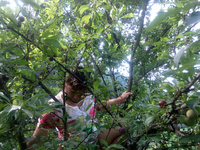
回家摘李子
2016年7月,族里老人乌娄伊去世,回家拍到的相片。

族里姐妹
这是送乌娄伊老人上山的时候,族里的姐妹们拍的相片,难得有这么一次。
JPA的查询语言—JPQL的命名查询@NamedQuery
JPA的查询语言—JPQL的命名查询@NamedQuery http://www.cnblogs.com/lu…
mvc:view-controller和mvc:resources
mvc:view-controller和mvc:resources http://wanghongxu.ite…